Setting: TORUS App Registration
Api.Initialize() and App Registration Information
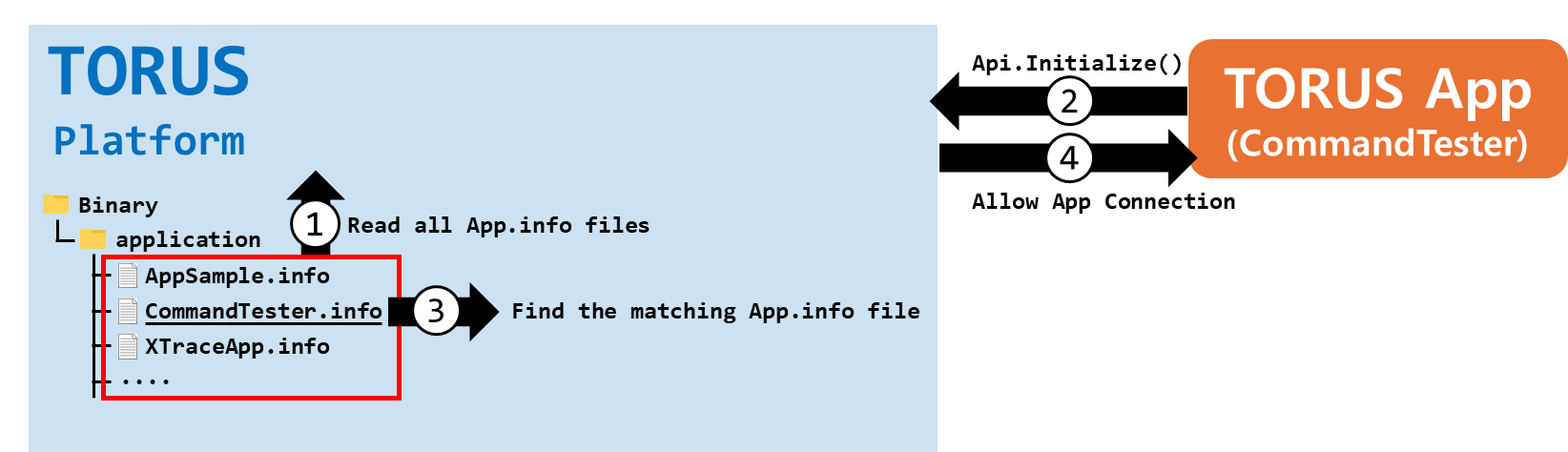
The TORUS App connects to the TORUS platform through the Api.Initialize() function. Therefore, after running, the TORUS App must first execute Api.Initialize() to connect to the TORUS platform.
When the TORUS platform receives a connection request from a TORUS App, it checks whether there is matching app registration information among the ones it holds. If matching registration information exists, the TORUS platform allows the connection; otherwise, it denies it.
To register App information on the TORUS platform, you need to create an information file in JSON format and place it in the [TORUS Install Foler]/Binary/application folder. These information files are called "App Registration Information Files" (AppInfo files). Since the TORUS platform reads the App Registration Information Files only at platform startup, you need to restart the TORUS platform if new files are added.
App Registration Information File Creation
As mentioned above, the TORUS platform must have an App Registration Information File for the TORUS App to be able to connect to the TORUS platform. Therefore, if you develop a new TORUS App, you should distribute the App Registration Information File of that TORUS App along with it.
The naming format of the App Registration Information File is "[AppName].info". The extension must be "info".
The content of the App Registration Information File consists of the properties necessary for the TORUS platform to recognize and identify the TORUS App.
Example of App.info (App Registration Information File of the TORUS App "CommandTester")
| { "App ID": "4300C7D2-FB9B-45B2-978C-DEB419FF5B94", "App Name": "CommandTester", "Version": "1.0.0", "App File": "CommandTester.exe" } |
In the example above, following the format "[AppName].info", the filename is CommandTester.info. The actual CommandTester.info file is located in the [TORUS Install Folder]/Binary/application folder.
"CommandTester" is a TORUS App provided by default during TORUS installation for testing purposes. [TORUS Install Folder]/Binary/CommandTester.exe is the executable file of "CommandTester". If you delete the CommandTester.info file, "CommandTester" cannot connect to the TORUS platform.
In the example above, only the essential properties of the App Registration Information File are included. For the other properties, please refer to the TORUS manual.
The explanations of each property in the example are as follows:
- App ID: The GUID of the App.
- App Name: The name of the App, serving as the App's label.
- Version: The version information of the App.
- App File: The filename of the App's executable file (including the extension).
In the TORUS App, when executing Api.Initialize() as shown below, you need to provide AppID (GUID) and AppName (string) as parameters.
※ The following parameters are a basic usage example. For additional settings, please refer to the TORUS manual.
int result = Api.Initialize(new GUID("4300C7D2-FB9B-45B2-978C-DEB419FF5B94"), "CommandTester");
These three pieces of information—"AppID", "AppName", and "App executable filename"—must match the App Registration Information held by the TORUS platform for the TORUS platform to allow the connection of the TORUS App.