Api.updateData()
Api.updateData() is a function used to modify the status of equipment through the TORUS platform. This document introduces only the most basic usage. For detailed usage instructions, please refer to the TORUS manual. Below is a sample source code.
| using IntelligentApiCS; Guid appGuid = new Guid("68E8D436-0558-40C4-B4BA-AB0F54EFC697"); string appName = "TorusAppTest"; int initRet = Api.Initialize(appGuid, appName); Console.WriteLine("Initialize Result: " + initRet); Item updateItem = Item.Parse("{\"value\":[100.1]}"); int updateRet = Api.updateData("data://machine/channel/variable/userVariable", "machine=1&channel=1&variable=100", updateItem, out Item _); Console.WriteLine("updateData Result: " + updateRet); if (updateRet == 0) { Console.WriteLine("updateData was successful"); } |
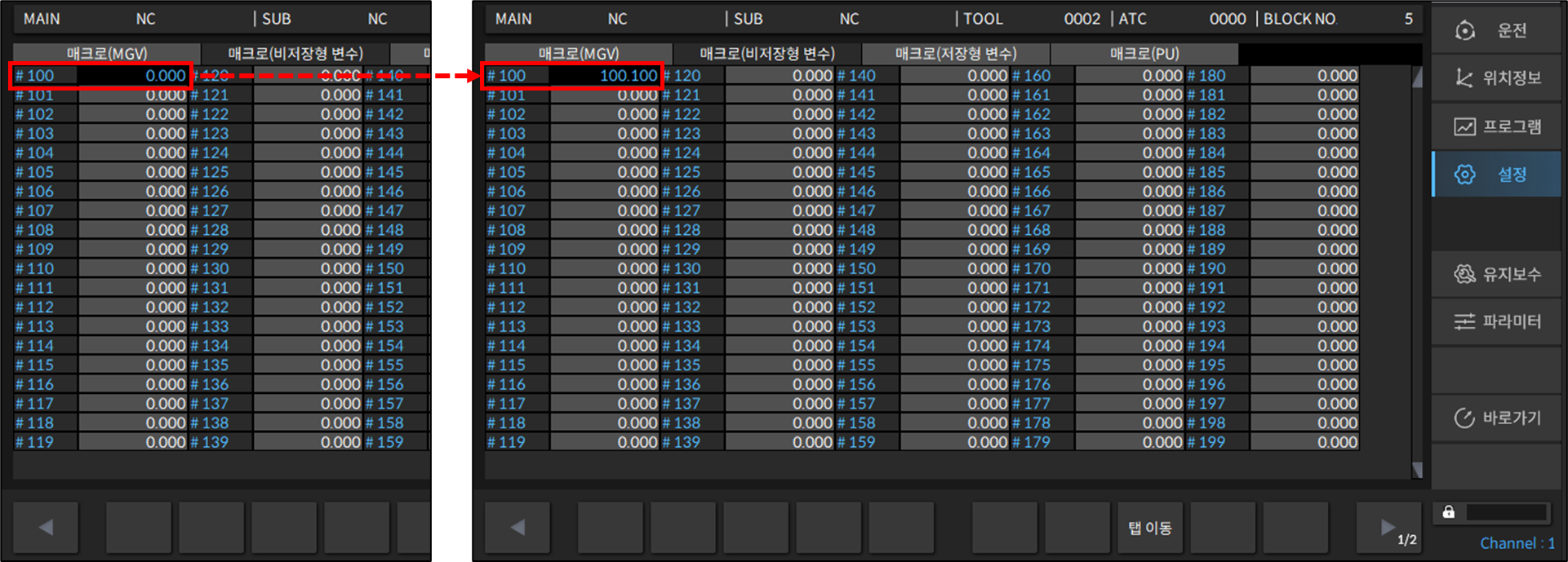
Api.updateData() requires the address and filter of the Machine Data Model as parameters. In the example, the Machine Data Model is User Variable (Macro Variable). According to the filter, it modifies the value of variable number 100 in the first channel of the CNC with Machine ID = 1. The available Machine Data Model items can be found in the TORUS manual.
The modified value should be written in JSON format, as shown in the sample code. The value is entered in the value field.
If the function returns 0, it means the status has been successfully modified.
A value other than 0 indicates an error code. You can check the list of error codes in the TORUS manual.
※ Some Machine Data Models cannot be modified. In the TORUS manual, you can verify whether each Machine Data Model is available for both data retrieval and modification.
Below is the debugging result. The status of the equipment has also been changed.
| Initialize Result: 0 updateData Result: 0 updateData was successful |