Api.Initialize()
Api.Initialize() is a function that attempts to connect to the TORUS platform. It must be the first function called among the TORUS API functions. Below is an example source code. First, you need to define the App GUID and App Name for the TORUS App.
| using IntelligentApiCS; Guid appGuid = new Guid("68E8D436-0558-40C4-B4BA-AB0F54EFC697"); string appName = "TorusAppTest"; int initRet = Api.Initialize(appGuid, appName); Console.WriteLine("Initialize Result: " + initRet); |
At this point, you need to create an App Registration Information File using the appGUID and appName, and register it with the TORUS platform. If there is no App Registration Information File in the TORUS platform, the following message will be displayed in the Application manager, and the connection to TORUS will fail.
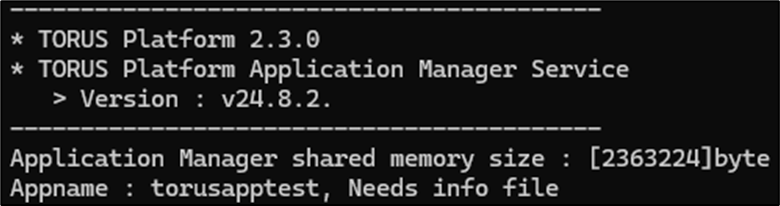
Create the App Registration Information File as shown below, and copy it to the [TORUS Install Folder]/Binary/application folder. The file should be named using the App Name, such as TorusAppTest.info.
| { "App ID": "68E8D436-0558-40C4-B4BA-AB0F54EFC697", "App Name": "TorusAppTest", "Version": "1.0.0", "App File": "TorusAppTest.exe" } |
You need to restart the TORUS platform for the changes to the App Registration Information File to take effect. After restarting the TORUS platform, you can debug the source code and check the result of Api.Initialize() as shown below. If the result is 0, the connection to the TORUS platform has been successfully established.
| Initialize Result: 0 |